

Every Infor CloudSuite release brings about updates, fixes and enhancements. For ERP teams, the challenge is figuring out how these changes affect their specific environment, identifying which business processes require testing and to keep operations running smoothly without disruption.
Because there are monthly updates and two major releases each year, reviewing release documentation, assessing impacts, maintaining test scripts and executing regression tests can become a heavy workload.
Fortest, an automated regression testing solution with its new AI capabilities, addresses these challenges. Fortest’s capabilities cover the testing lifecycle. The AI-powered Release Management Agent, which is an add-on to Fortest, identifies areas potentially affected by Infor updates to AI-assisted script generation, self-healing and intelligent execution reporting.
Here’s a technical look at how these capabilities work, how they fit together and what they mean for ERP teams.
1. AI-powered release assurance: Identifying what actually needs testing
Although an Infor release introduces many changes, not every change is relevant to every business. For example, an enhancement affecting a manufacturing process might be relevant to one organization but have little impact on another. The challenge is understanding which updates match with your particular business needs and processes.
Traditionally, identifying the relevant changes requires teams to manually review release documentation, compare it with their existing configurations and decide where testing should focus.
Fortest’s AI-powered Release Management Agent helps automate this analysis. It provides detailed reports that help you have a better understanding of the impact of the changes to your business.
How the Release Management Agent works
The agent creates a dashboard which gives ERP teams a detailed view of the changes coming their way, the components that may be affected, and the functions requiring attention.
This is also where AI-powered release assurance connects with test automation. The identified impacts give input to the automation team, helping them choose and prioritize the scenarios that should be executed, instead of dividing their attention on all aspects.
It is important to note that impact analysis does not stop the need for testing. Rather, it helps teams make better and more informed decisions about what to test.
2. AI-powered script generation: Turning business processes into executable tests
Once the affected areas have been identified, the next challenge is to get the test scenarios ready.
Traditionally, creating automated test scripts means identifying application elements, writing test logic, incorporating test data and listing out expected outcomes.
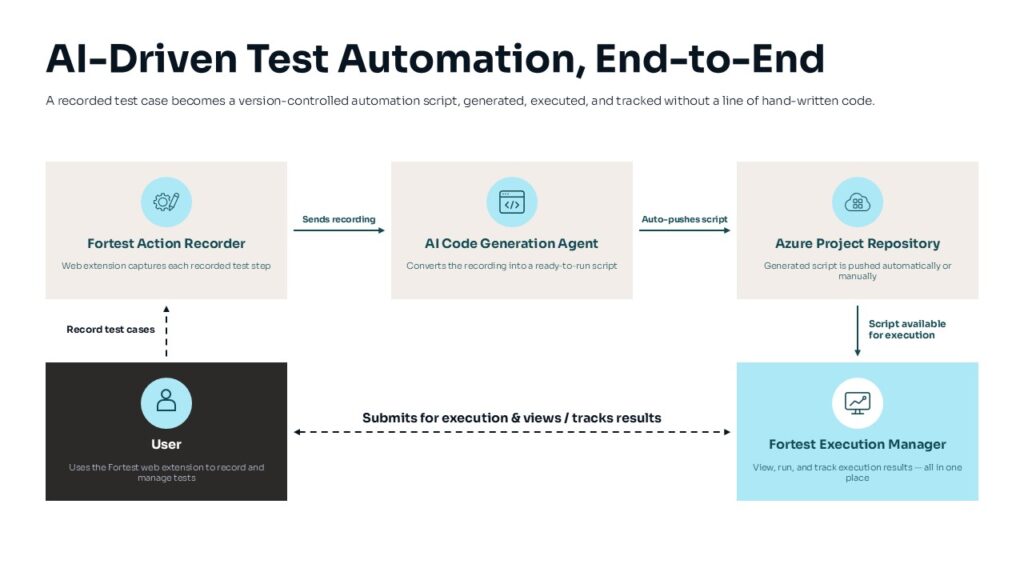
Fortest’s AI-powered Action Recorder reduces this effort by capturing business scenarios as users perform them.
How the Action Recorder works
Fortest provides a browser extension that runs while the application is being tested. As users perform a business scenario, it records their actions and captures relevant application element information.
Users can add parameters, assertions and page definitions to structure the recording and specify the expected results. Once the recording is complete, the scenario is submitted through Fortest’s AI code-generation process. The generated scripts can then be transferred into an Azure project repository and brought into the Fortest Execution Manager.
Where AI makes a difference
Fortest already uses reusable testing libraries and prebuilt industry-specific test cases for areas such as fashion and food & beverage. These provide a foundation for building automation suites without developing every scenario from scratch.
AI-assisted script generation extends this approach by reducing the manual coding required to automate additional scenarios.
For example, Fortest’s AI-assisted approach can reduce the time required to develop a complex script from approximately 12–13 hours to 15–20 minutes, depending on complexity. This shows the time that could be saved by using AI-assisted script generation.
Although generated scripts still require validation and stabilization before regular use, the effort involved in initial script creation is reduced. This allows ERP teams to devote more attention to defining meaningful test coverage and validating business outcomes.
3. AI-powered self-healing: Keeping test scripts functional as applications change
Automated scripts require constant maintenance, particularly in cloud ERP environments that undergo updates quite regularly.
For example, an application update may change a user interface element, causing an automated test to fail even though the underlying business process continues to function correctly.
Fortest’s AI-powered self-healing capability helps identify and address supported UI-related changes without treating every script failure as an error in the system.
When a fixable failure occurs, Fortest can identify the required healing action. A user must then verify and authorize the change before execution continues.
This reduces routine script maintenance while keeping human oversight and allowing teams to concentrate on failures that may be genuine functional issues.
4. Fortest execution manager: From individual tests to managed regression suites
As organizations automate more scenarios, managing the resulting test suite becomes increasingly important.
An ERP environment may have hundreds of test cases from finance, procurement, manufacturing, to inventory management and integrations with external applications.
Running these tests is only the first step. Teams must also determine when to execute them, organize them into meaningful groups, track results and investigate failures.
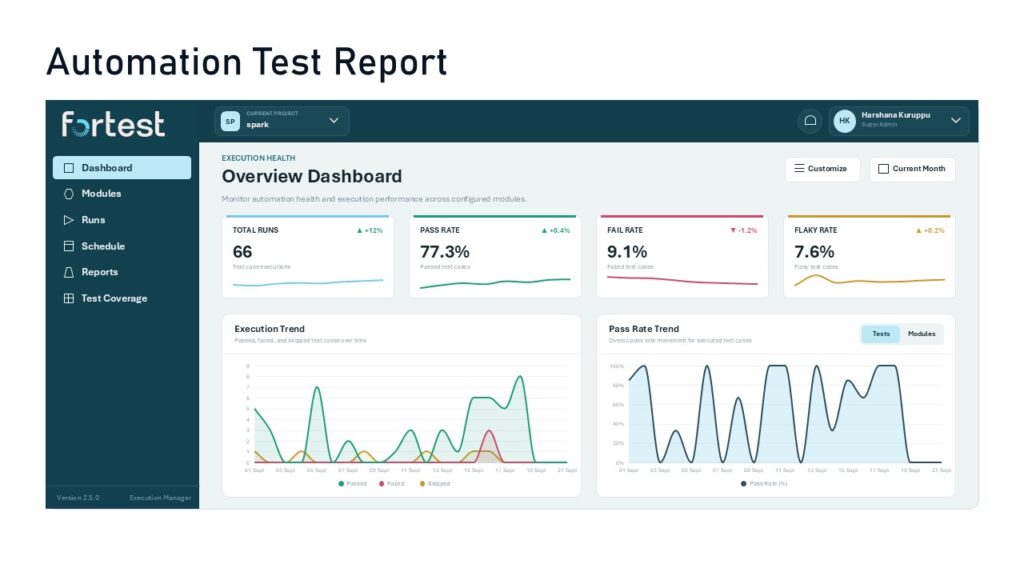
Fortest’s Execution Manager brings these activities into a centralized interface.
Organizing and scheduling tests
Test cases can be grouped into functional test plans, allowing teams to execute individual groups or an entire regression suite. For example, an ERP team might run procurement-related tests after a change affecting that functional area, while scheduling a broader regression suite ahead of a major release.
The Execution Manager supports on-demand and scheduled execution, including sequential and parallel test runs. Its calendar view also allows teams to plan their testing activities around upcoming release cycles.
This enables organizations to schedule repetitive testing outside normal working hours, which helps reduce the time business users need to spend running the same scenarios manually.
Making test results easier to investigate
The Execution Manager offers reporting views that help teams track progress. These include execution results, results at the module level, pass and fail statuses, execution history and categories of failures.
A heatmap feature shows test results across functional modules, giving teams a way to identify areas that may require further investigation. Users can go deeper into individual test results to review execution history and inspect previous outcomes, including information about self-healing activity.
Fortest can also capture screenshots during test execution, including at key validation points and failed steps, depending on the settings preferred by the user.
All these reporting tools together provide technical teams with evidence to investigate failures and support decisions about whether an application change is ready for production.
5. End-to-end testing: Validating business processes across multiple systems
Enterprise business processes rarely operate within a single application. A transaction may start in an external system, pass through an integration layer and continue into Infor M3 or another operational application. While individual applications may function correctly, failures can still occur as transactions move between systems.
Fortest supports end-to-end automation across web-based applications and APIs. This allows ERP teams to validate business processes that span multiple systems, rather than testing individual transactions in isolation.
To support these workflows, Fortest incorporates several capabilities:
- Cross-application testing: Automates processes that move between Infor M3 and connected applications, including external web-based systems and APIs.
- Parameterized testing: Allows teams to execute the same automated scenario with different input data without creating separate scripts for each variation.
- Transaction-level validation: Captures information generated during execution, such as customer order numbers, and carries it across subsequent steps for verification.
- Expected outcome verification: Validates transaction statuses and other defined checkpoints to determine whether a business process has been completed successfully.
These capabilities allow ERP teams to automate and validate interconnected business processes. This helps identify potential issues across application and integration boundaries.
Human oversight and test governance remain essential
While AI can analyze release impacts, generate scripts and support self-healing, human validation is still important throughout the testing lifecycle.
For example, Fortest’s Action Recorder captures sensitive inputs such as passwords as parameters rather than exposing them directly to the AI agent or including them in generated code. Its self-healing process also requires user verification before execution continues.
Fortude’s automation delivery methodology incorporates test case selection, script development, stabilization and user acceptance testing (UAT). Business users need to confirm that the automated scenarios represent the intended processes and use the correct test data before regular execution. This helps ensure that organizations are automating the correct scenarios rather than simply increasing the amount of automated tests.
It’s also important to distinguish the available capabilities from the product roadmap. Fortest currently supports web-based applications and APIs. Native desktop and mobile application testing are roadmap items. The AI-powered Release Management Agent is available as an add-on for Infor CloudSuite customers, complementing Fortest’s existing automation capabilities.
What does this look like in a production ERP environment?
The value of automated regression testing becomes clearer when considering the time and resources required to test a complex ERP environment.
An Australian dairy manufacturer faced significant challenges completing regression testing because its key business users had limited time available alongside their daily operational responsibilities. As a result, it was under tested, increasing the risk of issues reaching production.
To address this, Fortude identified and automated 367 end-to-end test cases using Fortest.
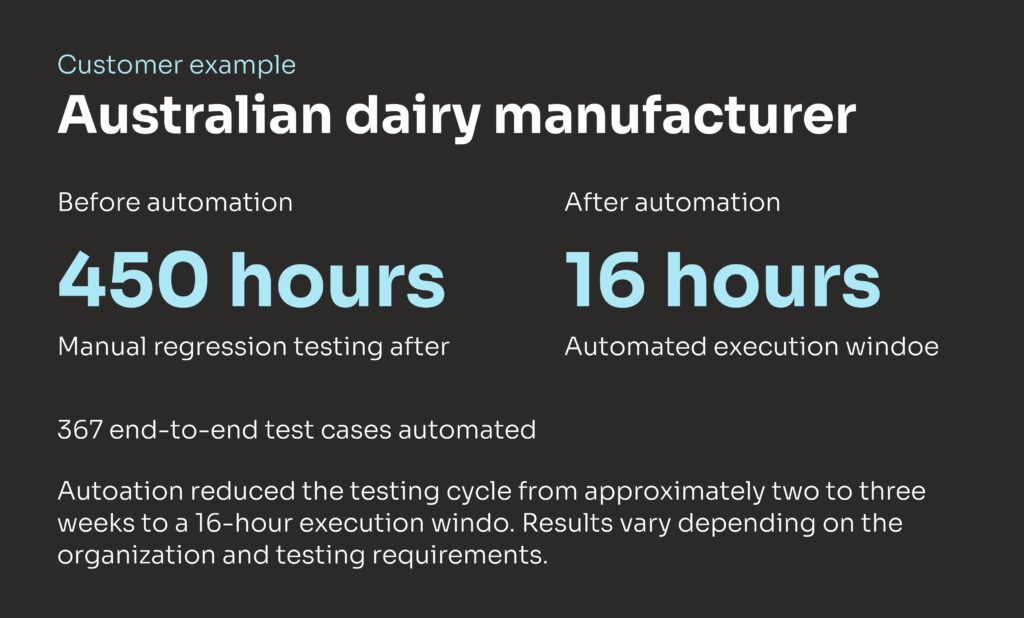
With Fortest, the manufacturer can now execute its regression suite outside working hours or over weekends and receive results within a day. This reduces the testing burden on business users while supporting better regression coverage and business continuity.
A similar approach helped a large frozen food manufacturer automate 150 test cases, including 47 integration test cases. Fortude completed the entire implementation, from test case identification and script development to user acceptance testing (UAT) and go-live, within five weeks. The manufacturer can now execute its automated regression suite in approximately three to five hours, compared to the two to three weeks previously required.
These customer experiences show how automated regression testing can significantly reduce repetitive manual effort and shorten testing cycles. They also highlight the importance of selecting the right test scenarios, validating automated scripts and maintaining them as business processes evolve.
Bringing AI-powered release assurance and automated testing together
Managing ERP releases involves more than understanding what has changed. Teams must identify potential impacts, select appropriate test scenarios, maintain their automation suites, execute tests and investigate the results.
Fortest’s agentic capabilities include these connected activities. The Release Management Agent helps identify and prioritize affected areas, AI-assisted script generation accelerates test development, self-healing supports maintenance, and the Execution Manager centralizes execution and reporting.
Together, they provide a more connected approach to ERP release assurance and regression testing, helping technical teams manage frequent updates while retaining control over critical validation decisions.
See Fortest's AI capabilities in action.
Watch our webinar on AI-powered release assurance and automated regression testing to explore the product demonstrations and customer examples, or connect with our team to discuss automating regression testing in your ERP environment.